“An AI second brain is a personal knowledge system that captures your ideas, references, notes, and projects in one connected workspace, and is continuously read by an AI assistant that uses that context to answer questions, surface forgotten material, and generate new work. It is the AI-native evolution of the “second brain” concept popularized by Tiago Forte in 2022, where the AI does not replace your thinking, but reads everything you have captured before it responds.”
Definition from storyflow.so, author Justkay.
Inb4: I’m into Claude-maxxing. Use your preferred frontier AI model for this, but my bias should be known upfront.
How I got here
I had first heard of this concept while briefly skimming YouTube videos as I lay rotting on my couch looking for something to watch. At first it didn’t really register and I didn’t click on it because (definitely with my algorithm) my feed is full of plenty - and arguably an unhealthy amount - of coding, AI, tech, and Cyberpunk 2077 videos with the occasional Japanese micro apartment tour video sprinkled in for good measure. Especially nowadays, I’m so hesitant to watch any video about AI from some random dude with a snapback hat with like 15K subscribers and has a folder on his desktop labeled “Chess Moves” where he keeps his “business strategy” files - basically reeks of internet guru slop and frankly I’m not about that.
 Yeah, these kinds of videos.
However, the idea of using AI as a “second brain” did capture my attention conceptually for a moment as I’m all in on using frontier AI models to significantly increase productivity across multiple domains. Despite that, I did keep scrolling because my dinner was getting cold as I was trying hard to find something to watch while I eat and inevitably nap.
A few weeks later my brother shot me a much more interesting video (admittedly I didn’t watch, see reasoning above), but my brother is a serious, tech-savvy guy who does insane work teaching himself programming, 3D printing, making a mobile app (makes homemade drones too, as one does) and that really sparked the thought into my head that hey maybe this is something worth looking into. My brother and I do have pretty good discussions regarding utilizing AI for personal things as well as work, and are in agreement that an individual’s ability to efficiently utilize AI frontier models will be a legitimate differentiating skill in the modern/future workplace.
I like to think of AI as a tool - say, like a hammer: There are skilled tradesmen who use hammers in creating beautiful buildings, works of art, high quality furniture, and so on; and then there are people who can only use a hammer to throw a couple thumbtacks into the dry wall to hang “Live, Laugh, Love” signs in their dining rooms. Not throwing any shade to Target though - Target’s great, generic kitchen artwork aside.
Enough about hammers - back to the Second Brain: After my conversation with my brother I naturally turned to Claude to try and understand what the concept actually is, how it can be useful, and is it even something worth trying to set up. I must admit I did also turn to some of the internet guru videos (tried to find some good ones - couldn’t), and I was able to gather the gist quickly enough to at least make a more informed prompt.
 Asking Claude to explain the concept before building anything
To quote the esteemed author, Claude:
/////BEGIN QUOTE/////
Where the idea came from
“Second brain” as a term is Tiago Forte’s, from his 2022 book Building a Second Brain. But the concept is old and the book is mostly repackaging. The lineage runs back through David Allen’s Getting Things Done (1999), Niklas Luhmann’s Zettelkasten (a German sociologist’s index-card system from the 1950s-90s, credited with letting him publish 70 books), and further back to commonplace books - the notebooks Renaissance scholars kept of quotes and observations, cross-indexed by theme.
The claim underneath all of them is the same: your brain is good at thinking and bad at storage, so stop asking it to store things. Offload retention to a system you trust, and free up working memory for the part machines can’t do.
Forte’s framing is CODE: Capture, Organize, Distill, Express. Worth knowing because you’ll see it everywhere, but three of those four are filler. The one that matters is Distill. Everything else is logistics.
What AI actually changed
This is the part worth being precise about, because the marketing overstates it badly.
Before LLMs, the bottleneck in any note system was retrieval. You had to remember that you’d written a note, roughly what you called it, and roughly what words were in it. Keyword search only works if you can guess the keyword your past self used. This is why so many vaults die: people write notes and then can never find them again, so they stop trusting the system, so they stop writing.
LLMs collapsed that bottleneck. You can now ask a fuzzy question - “didn’t I hit something like this before, where a thing looked fine locally but 404’d live?” - and get the right note back without knowing its name. That’s real, and it’s the whole delta.
What AI did not change:
- Capture still requires you. Claude doesn’t know what happened in your day.
- Judgment still requires you. Claude can’t tell what mattered.
- Understanding still requires you. A summary you didn’t write teaches you nothing.
So the accurate statement is: AI fixed the retrieval problem in note-taking, and note-taking still has all its other problems.
/////END QUOTE/////
I love that line: “Your brain is good at thinking and bad at storage, so stop asking it to store things.” I think that made the concept click a lot faster for me than Chess Moves bro and his failed ecommerce drop-shipping business (maybe I’m just projecting here, I’m sure he’s a nice guy). This is definitely an area in my entire student and work career I’ve come incredibly short in: I’ll take plenty of notes in class, while doing a course, listening to a lecture, highlighting stuff in books I read, all of it - and then…I like, never go back and read them. Fortunately, I’ve been quite blessed with very good memory and I’m at least on the good end of the normal distribution curve of average IQ (total midwit though, I am what I am) so I’ve been a perpetual B+/A- student my entire life just by paying attention to the material presented. Where I’ve struggled though is having good, accessible, and more importantly usable reference material to draw from when I need it most. My memory is good but it’s not THAT good to be able to recall obscure data, quotes, niche concepts from economic literature, what I ate for breakfast, etc. All to say, utilizing the new hot tool in the modern world to solve a shortcoming of mine sounds like an excellent use of my time.
Turns out I was already doing this
In my dialogue with Claude, it turns out that I’ve been doing this informally, yet structurally for quite awhile already - case in point, the website this article is hosted on:
- The whole point of me creating evanireland.tech is to serve two goals:
- Primarily as a portfolio to showcase my work, skills, and domain knowledge for potential employers/clients/colleagues.
- Very close second is to be my own personal hub of reference material (the IT Field Manual, playbooks, runbooks, the to-be-published script repo, and so on) so I always have it available to me as long as I have an internet connection.
- I do the work firsthand (I do the projects, I save the reference material I find useful, I find the appropriate scripts and save them to VS Code), I take notes and screenshots as I go along, but then I utilize Claude to distill what I’ve done, clean up my digitally chicken-scratched, disheveled notes and documentation, turn it into a legible document, and integrate into the existing website files.
- What I accomplish doing this way is a very efficient way to leverage what I’m good at, and what I could still do but could instead use an AI assistant to do much better and faster.
- I do work, I learn skills, I find helpful resource material I would REALLY LIKE TO BE ABLE TO CONTINUE TO USE, I write it down, save it, and ask Claude to store it in a legible and accessible manner - and thanks to Claude I can do this veeerrryyy quickly and much better than if I were doing it by myself.
- The IT Field Manual is the single best example I have of this: Cards on the table, do you think I wrote that start to finish? Helllll noooooo. What I did actually do is run through and find everything that’s listed there though, I tried out the scripts to make sure they worked, I did the troubleshooting steps to verify they were legit, but then Ol’ Buddy Claude distills the chaos into a very organized, singular reference complete with fancy hyperlinks, tags, tables, and so on. And it comes in handy to fill in gaps that I missed and/or didn’t properly articulate in my note taking process.
That’s really what is meant in Claude’s response: “the bottleneck in any note system was retrieval. You had to remember that you’d written a note, roughly what you called it, and roughly what words were in it. Keyword search only works if you can guess the keyword your past self used.”
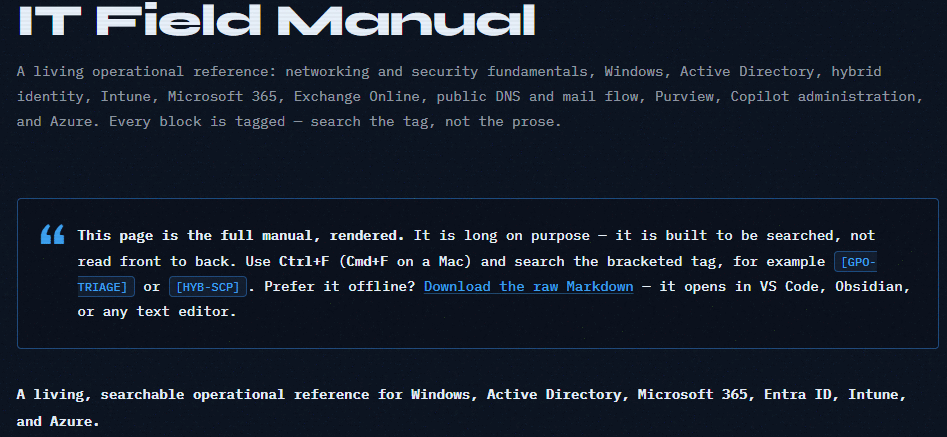 One of the reference pages this system is supposed to make easier to find again
Another quite righteous example of a way I’m going to use this concept: This article. What I’m presently doing as I type is:
- Writing the prose for the article, stream-of-conscious, thinking as I go along and making nice sounding words
- I do the setup for the Second Brain utilizing Claude and the system it’s helping me develop
- I take screenshots of the things I find interesting
- Continue taking notes and refining
- And when I’m done I’m going to drop all of this into the upcoming 00. Inbox folder to test the concept.
- You’ll know I’ve been successful by reading the article.
- And now I’ll have a reference to be shared with anyone who wants to set up their own second brain by yet another dude in his 30s wearing a snapback hat who has his own website. Oh God, what have I become…
Also, for the sake of argument - yes I do indeed do my own writing (see below). Will I use Claude to help clean up my monkey brain writing and make it way prettier? You’re absolutely right.
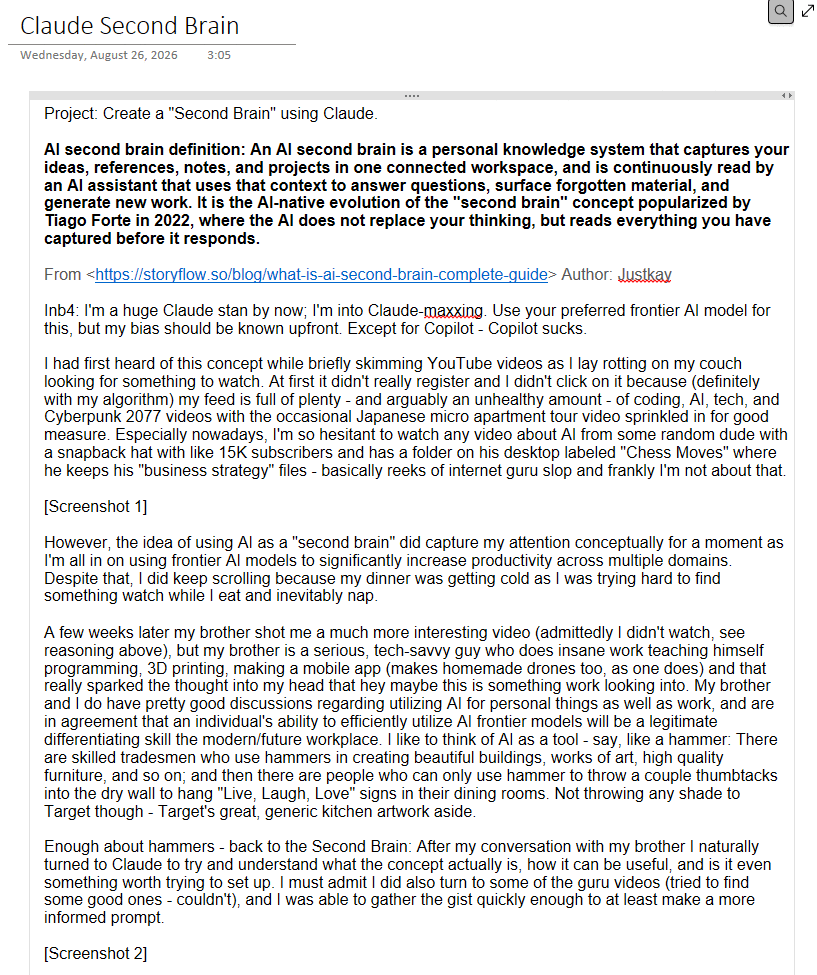 Yes, this is a screenshot of the article you’re reading, mid-draft, placeholders and all
Now let’s set this Bad Johnson up.
Setting it up
So my big brain move after watching some videos on “How to Set Up Your Second Brain to Run Your Affiliate Marketing Site Slop” and listening to these guys with their convoluted setups was to… (I’m not even kidding, when I asked Grok to help come up with internet guru slop business ideas to make fun of, one of the examples was: “Notion Templates / Swipe Files / ‘Operating System’ - A second brain that is just folders. Sold as leverage.” That is so awesome)
…just ask AI to help me set it up and show me how to use it. What a concept - off to a great start already!
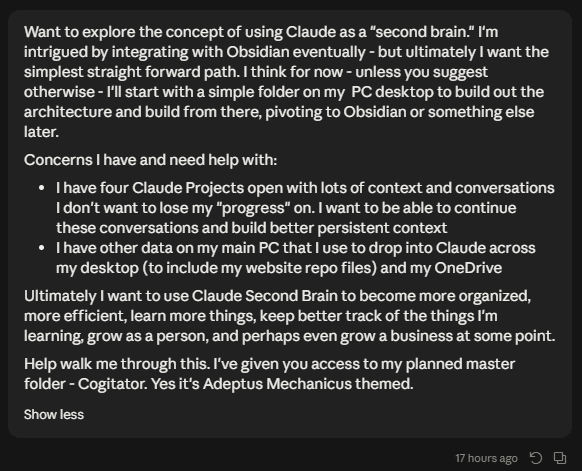 I forgot to tell him “Make no mistakes.” Dang it…
First step I did was to create a simple, blank folder on my desktop. I felt like eschewing Obsidian because it looks way too annoying to setup for this and like, it’s just an .md text editor anyways. I reserve the right to set it up on Obsidian in the future out of curiosity, but to learn this I opted for the path of least resistance.
So a simple folder living on my desktop (backed up to OneDrive) it is. I felt like naming mine the Cogitator because 40K is cool, the Adeptus Mechanicus are cool (shouldn’t surprise anyone that a dude with a site like this is Ad Mech-down), and it gave me an excuse to create an Ad Mech icon to keep on my desktop.
 The empty folder that started it all
Anyways, when I submitted this prompt, I switched to Cowork mode and utilized the Opus 5 model set to High. I pointed Claude to the empty Cogitator folder and let it run.
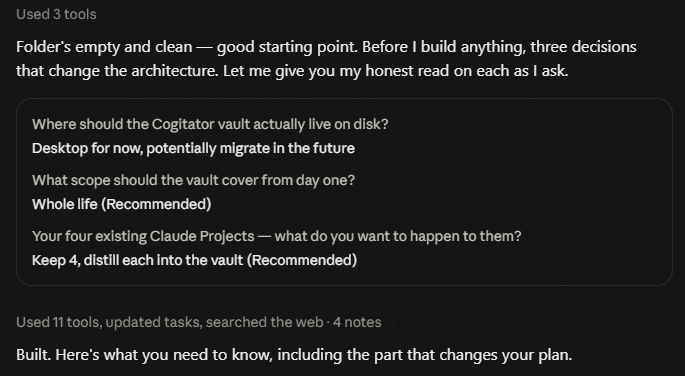 Claude asking for three decisions before writing a single file
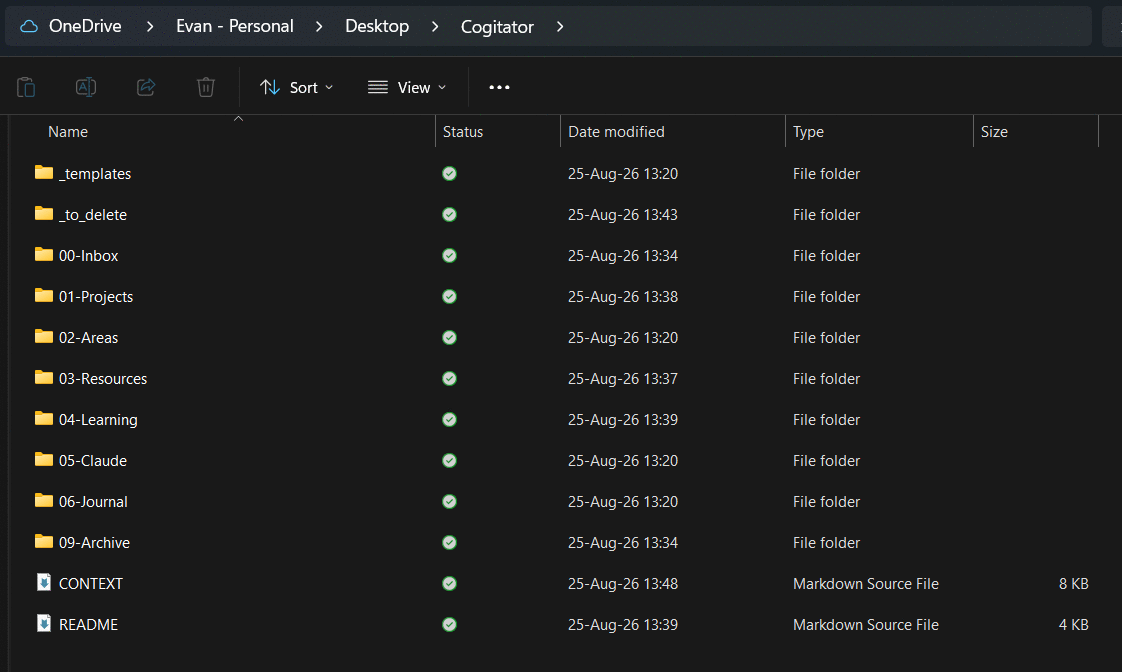 First pass at the architecture
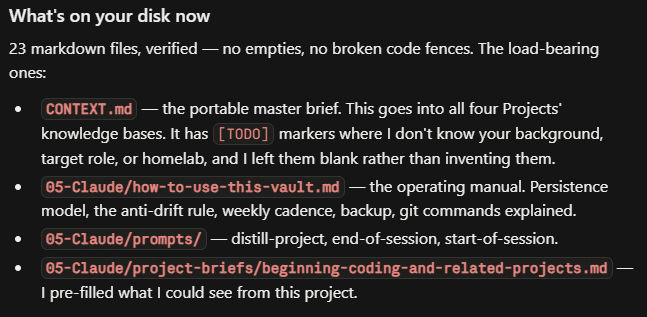 And a rundown of what actually landed on disk
Simple as that, no internet guru slop course required. Just use the AI model you’re guaranteed already paying for - or will end up paying for - if you’re going to set up a complicated storage system with it. Use the hammer for making useful things, not hanging “Live, Laugh, Love” signs in your kitchen, Madison.
How Claude actually remembers things
An important note here for understanding about how Claude/AI actually uses your saved context:
Think of AI memory like writing on a physical whiteboard in a specific meeting room.
- Conversations are like temporary room whiteboards. Everything you discuss during a chat is written on that room’s whiteboard so the AI can read it and respond in real-time. But the moment you start a fresh chat, you walk into a brand-new, empty room. The AI can’t see the whiteboard in the old room.
- Projects are like permanent notice boards in the hallway. Files and instructions you explicitly upload to a Project act as permanent reference boards posted in the hallway. Whenever you start a new chat inside that Project, the AI reads the hallway notice board first, but it still cannot see what was written on the whiteboards of your previous chats.
Because an AI cannot automatically carry past chat notes to a new conversation, you have to summarize the important details from an existing chat and explicitly post them onto the Project’s notice board so future chats can read them.
Simply put: A single chat is keeping track of what you’ve told it in a single chat, AI doesn’t necessarily know what you discussed in a different chat - even if they’re in the same Project umbrella. That is unless you have given the Project specific instructions and reference material to work with. Granted, Claude and some AI models do keep a persistent memory file about you generally, but it is very limited in what it’s going to keep track of.
Which is the point of what we’re doing here - bridging the gap between these conversations by using the “Second Brain” file system which is going to comprise instructions and references. We’re basically building a library for Claude to refer to when we ask it questions. I only have to tell it my favorite TV show as a kid was Hey Arnold one time and save it into an instruction file - not relitigate it every time I ask it about peak television. The flipside of this being, should heaven forbid I forget what my favorite TV show was as a kid I can ask Claude who now has perpetual access to that information no matter when I ask it or what we’re discussing in the first place.
There is one more piece worth knowing, and it’s the critical connecting piece: Cowork mode can read the folder directly. A regular chat inside a Project only sees the hallway notice board. A Cowork session with your folder connected sees the notice board and walks into your actual filing room. That is the difference between Claude knowing a summary of your projects and Claude reading the current state of them.
The first layout was wrong, but refinement is always possible
So, although Claude was able to write me the architecture directly into my folder - I didn’t quite like the way it had set it up. The structure felt a little off to me and I had to click through a bunch of confusing sub-folders, things were nested weird and weren’t where I as the user would expect them to be - all of that. However! You know what’s nice about using an AI agent for this in the first place??
I can just ask it to redo it in a way that makes more sense to me…and then it does it…and it works.
One important note for anyone who isn’t used to intelligently prompting AI models: You have to be specific. My go-to example is going to the barbershop: If you walk in and simply just ask for a haircut, you’re definitely going to get a haircut but it might not be the one you wanted - perhaps not even close to what you wanted. You HAVE to be specific - tell the barber exactly what you want or give him some references to work from. In this case - I have my OneDrive setup in a way that maps directly to how my brain likes folders/files set up. All I had to do to fix the Second Brain set up was point Claude at both my Cogitator folder and an offline copy of my OneDrive (with selected files deleted from it - I don’t want Claude to have access to specific things), and re-prompt “Make the Cogitator look more like this.” In short order I was able to have a file system in my Cogitator that is usable for both my brain and Claude programming. Simple as that.
 Pointing Claude at a folder I already navigate without thinking, and asking it to match that instead
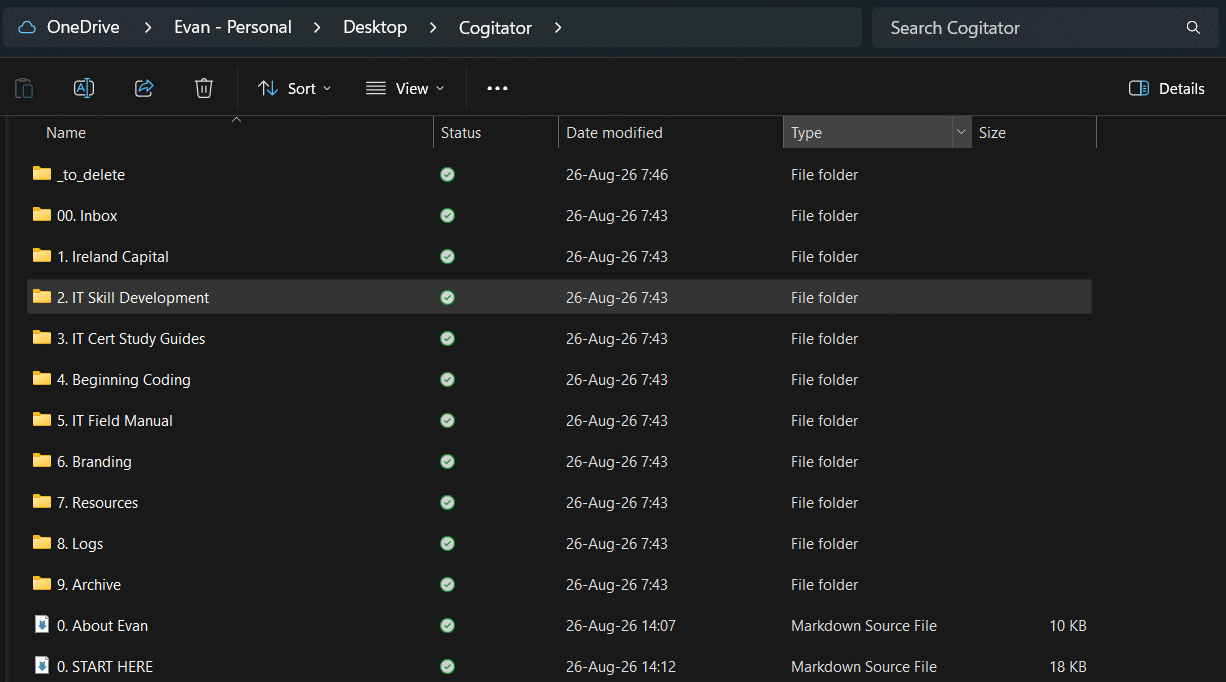 Current layout, derived from existing OneDrive conventions
The thing I want to flag here, because it is the actual lesson and not just a step: the layout does not have to be good for someone else, it has to be good for you. Claude’s first attempt was a widely-recommended structure, and is the type of structure you’d pay dude bro to be able to take his affiliate marketing course. It was also one I would have probably stopped using in a month, because every time I went looking for something I would have had to think about where it lived. Mine is numbered folders in Title Case because that is what my OneDrive already looks like and my hands already know it. Yours should look like whatever you already navigate without thinking.
The point is to build a tool YOU will use for YOUR work - you don’t have to take a cookie-cutter, boiler plate template; make the tool work for YOU.
Getting your existing chats out of their silos
So good - I have a file system architecture I like and organized the way that I want it. Next up is I need to get the relevant information to put in it. Personally, I have six Claude Project umbrellas I use:
- Ireland Capital: My personal finance and investing project
- IT Skill Development: Improving my IT domain knowledge skills
- IT Cert Study Guides: Self-explanatory
- Beginning Coding: Also self-explanatory
- IT Field Manual: The project I use to distill the knowledge I find out in the wild and integrate into one cohesive study guide
- Branding: For my resume, LinkedIn, social media posts, etc.
Here’s something I actually learned doing this and didn’t already know; worth internalizing before you try this: a new chat inside a Project cannot read your old chats in that same Project. Not “struggles to.” It cannot. Back to the whiteboard - every conversation is its own room, and the door locks behind you.
So you can’t open a fresh chat and say “summarize everything we’ve worked on.” It does not know. It will either tell you so, or - worse - it will do the very 2023-ish AI thing where it will very confidently make things up.
What that means practically is that the distillation has to be run at the bottom of the existing chat, while that conversation still remembers itself. You are not asking Claude to go retrieve something. You are asking it to write down what is currently in the room before you leave it.
The prompt Claude gave me (pro-tip: ask the AI how to best use it) looks like this:
I am building a persistent knowledge system and I need to capture the state of this
work before this conversation's context is lost.

Write me a single markdown document that a future version of you - one with **zero**
memory of this conversation - could read cold and immediately be as useful as you
are right now. Assume that reader knows nothing except what you write.

Use exactly these headings:

## Purpose
What this project is for, in two or three sentences. Why it exists, not just what
it is.

## Current state (as of <today's date>)
Where things actually stand. What is built, what works, what is half-finished, what
is broken. Be concrete. "The deploy script works" is useless; "deploy.ps1 pushes to
the gh-pages branch, but does not handle the custom domain CNAME" is useful.

## Key decisions and why
Every real decision we made, with the reasoning. This is the most valuable section -
it stops a future conversation from talking me back out of a decision I already made
for good reasons. Format each as: decision, then the reason in one line.

## Dead ends - do not try these again
Approaches we tried that failed, and why they failed. Be specific about the failure
mode. This section saves me the most time and it is the one people forget to write.

## Conventions and vocabulary
Naming schemes, file layouts, terms we use in a specific way, formatting rules,
anything where "how we do it here" differs from the generic default.

## Open threads
Unfinished work and unanswered questions, ordered most-important first. For each,
say what the actual next action is - a verb, not a topic.

## What Claude should know about working with me on this
Anything about my skill level in this area, my preferences, or how I like this
particular kind of work handled.

Rules for writing it:

- **Do not flatter the work and do not inflate progress.** If something is barely
  started, say barely started. An over-optimistic brief is worse than no brief,
  because I will act on it.
- **Do not include anything you are not confident actually happened** in this
  conversation. If you are unsure, mark it `[uncertain]` rather than smoothing it
  over.
- Prefer specifics over summary. File names, commands, versions, exact errors.
- If a section genuinely has nothing in it, write "None yet." Do not pad it.
- Output raw markdown in a single code block so I can copy it cleanly.
Two things about that prompt are doing most of the work, and they are not the obvious ones.
“Dead ends - do not try these again” is the section nobody writes and the one that pays for the whole exercise. Every project has three or four approaches you tried that failed for a specific reason, and six months later that reason is completely gone from your head. Mine has entries like “Jekyll silently drops future-dated posts, with no build error” - which cost me a genuinely annoying afternoon once and will now never cost me one again. Nice try!
“Do not flatter the work and do not inflate progress” exists because the default failure mode of an AI summary is optimism. A brief that says a thing is “largely complete” when it is half-built is worse than having no brief at all, because you will plan against it.
I ran that prompt on the two or three load-bearing chats inside each Project - not every chat, just the ones actually carrying the work - and ended up with eleven documents. Then I saved all eleven into the 00. Inbox folder and did not sort a single one of them.
And then we get to the part that still feels slightly illegal. I opened a Cowork session, pointed it at the Inbox, and said “file these where they go.” It read all eleven, worked out which Project each belonged to, merged the three-per-project ones into single briefs, and put them away. It also caught two things I would not have: one of my distillations described the website as being on a theme I had migrated away from days earlier (the “as of” date on a distillation is the date you ran it, not the date the work happened), and two different briefs described my own skill level in flatly contradictory ways.
While I’ll be a son of a gun… Also worth doing: Make Claude audit your folder through multiple iterations; make it catch these inconsistencies early and often. AI is good but it’s not perfect, feel me?
What is actually in the folder, and what each piece does
This is the part I wanted to lay out plainly, because “second brain” gets used to describe everything from a Notion template to a paid course, and in practice mine is about five ideas.
Here is the whole thing:
Cogitator/
├── 0. About Evan.md          <- who I am. the one file Claude always gets.
├── 0. START HERE.md          <- how the system works. rules and conventions.
├── 00. Inbox/                <- dump zone. no rules. emptied weekly.
├── 1. Ireland Capital/       ┐
├── 2. IT Skill Development/  │
├── 3. IT Cert Study Guides/  │  one folder per Claude Project.
├── 4. Beginning Coding/      │  the number matches the project.
├── 5. IT Field Manual/       │
├── 6. Branding/              ┘
├── 7. Resources/             <- stuff that serves more than one project
├── 8. Logs/                  <- learning log, weekly reviews
└── 9. Archive/               <- finished or superseded, kept anyway
And every one of those six project folders is identical inside:
2. IT Skill Development/
├── 0. Brief.md      <- the state of this project
├── 1. Working/      <- what I'm actively doing
├── 2. Reference/    <- finished stuff I'll look up later
└── 9. Archive/      <- superseded, kept
That sameness is deliberate and systematic - which when building a “system” is kind of the point, yeah? Claude can open any project folder and already know where things are without hunting, and more importantly I never have to decide where something goes.
0. About Evan.md is the master context file - who I am, my background, what I’m working toward, my certs, how I want Claude to talk to me (bluntly, explain the mechanism behind commands, don’t inflate progress), and what I’m currently focused on. This is the only file I upload into a Claude Project’s knowledge base, so even a plain chat on my phone knows who it’s talking to. It changes maybe monthly.
0. START HERE.md is the operating manual - the naming conventions, the map of the folders, how the projects feed each other, and a list of things that are already decided so a fresh Claude doesn’t spend three paragraphs re-raising them. This one stays on disk. Cowork reads it live.
N. <Project>/0. Brief.md is the per-project state file, and it is the workhorse. It carries the seven sections from that distillation prompt - purpose, current state, decisions and why, dead ends, conventions, open threads, and how to work with me on this specific thing. When I finish a session, this is the file that gets updated. When I start a session, this is the file that gets read.
00. Inbox is a dump zone with zero rules. Screenshots, half-thoughts, exports, files I pulled off OneDrive, whatever. The rule is that capture has to be frictionless or you stop capturing, and deciding where a thing belongs is a completely separate job from writing it down. I empty it about once a week by pointing Claude at it and saying “file these.”
7. Resources holds anything serving more than one project - my writing style reference, reusable prompts, and a running “field lessons” file that is every “dead ends” section from every brief pulled into one searchable place. That last one gets used more than I expected, because a dead end is a fact about a tool, not about a project, and I go looking for it by symptom.
The one rule that keeps this from rotting: the folder is the source of truth, and only 0. About Evan.md gets uploaded into Claude’s project knowledge. Briefs stay on disk and get read live. If you upload a copy of a brief and then edit the original, you now have two versions and Claude will confidently use the stale one. Ask me how I know.
Dumping in everything else
And you can extrapolate from there and drop in other information you need organized. For example, before I was doing this I had files saved on my OneDrive or otherwise on my PC locally. Previously I would drag and drop these into the chats/Projects manually and instruct Claude from there. As previously alluded to: This can become quite cumbersome and I’m storing data/information/documents across multiple streams with varying degrees of uniformity - another issue that the Second Brain concept aims to solve. To bring the quote up again: “Your brain is good at thinking and bad at storage, so stop asking it to store things.”
With this in mind, I more or less grabbed every file I could find that I would want ingested and integrated into this data borg - spreadsheets from my OneDrive, odd Word documents with notes, other study guides, reference material, etc; basically anything I wanted organized by Claude, analyzed, stored for future reference while still providing easy enough access for me to update things manually (e.g. a financial spreadsheet I make manual updates to, but save directly in the Cogitator for Claude to access and store). Drop all of that in your inbox and re-prompt “Analyze and store these documents into the proper projects.”
That run was 157 files and about 71 MB - screenshots, playbooks, study guide PDFs, four versions of my IT Field Manual, a pile of resume drafts going back to March. A few things worth knowing about how that actually went, because it was not purely magic:
- It sorted everything by project and put active work in
1. Working/and finished material in2. Reference/, which is the split I would have made by hand and did not have to. - It found 28 groups of exact duplicates by checksum - the same AZ-900 study guide saved in two places, and 26 screenshots that existed twice under different filenames because I had renamed them for the website. It kept one copy of each and wrote a small mapping file so the rename is still reproducible. That is roughly 9 MB of my own mess that I did not know I had.
- It did not delete anything. Everything it pulled out went into a
_to_delete/folder for me to review and empty myself, which is the correct behavior and I would be suspicious of a setup that did otherwise.
Then the actual payoff. An example:
- Previously I had been using Grok for resume writing and help, storing all of my resume related documents in my OneDrive.
- I created the Branding Project in Claude for the explicit purpose of helping me build a cohesive “brand” for myself - a resume being a part of this line of effort.
- Up until I created this project, Claude had zero reference to work from other than what I’ve manually edited in its Memory or stored in a project context/instructions.
- With this Second Brain, I simply dragged and dropped all of my previous resume stuff (master resume, tailored resumes, bulleted lists of notes, and so on) into the
00. Inbox, pointed a Claude instance under the Branding umbrella, said organize/ingest these files, analyze them, and update my master resume based on the information you’re able to find in the Cogitator folder. For example, my new Microsoft certifications hadn’t been reflected anywhere in my OneDrive resume folder. But Claude knows that I passed/acquired these certifications from another Project. Since all the information canonically lives in one place, Claude is able to pull information together from different projects to enable its task under a single project. - And in a matter of minutes I had a brand new, updated, revised resume.
That last bullet is the whole “thesis” in one example, so I want to be precise about what happened. The resume lives in the Branding project. The certifications live in the Cert Study Guides project. The homelab build that supplies half the resume’s technical bullets lives in IT Skill Development. Those are three separate Claude Projects that cannot see each other - but they are three folders in one vault, and a Cowork session reads all of it. The Project boundary stops mattering the moment the material is on disk.
Things that broke, because they will break for you too
I am not going to pretend this was clean nor quite as straightforward as I’ve alluded to - which is also a big point of writing this all down in article-form. Three things went wrong, all of them mine, and all three are the kind of thing you will hit if you build one of these.
1. I renamed a file and broke the system’s own start-up prompt.
Early on, the master context file was called CONTEXT.md. Two rounds of reorganizing later it was called 0. About Evan.md - but the “start of session” prompt I had saved still told Claude to go read CONTEXT.md. So I opened a fresh chat, pasted my own prompt, and the first thing that happened was Claude telling me the file I had asked for did not exist.
The fix is boring and it is the actual lesson: when you rename something, grep the whole vault for the old name. Instructions that point at files rot the instant you move the files, and you will not notice because you know where everything is.
2. My instructions told Claude to upload files, so it did.
Every project brief had a line at the top saying “upload this file to that Project’s knowledge base.” That was written as a note to me. A Cowork session with folder access read it as an instruction to itself, and helpfully uploaded three files into my Branding project - creating exactly the duplicate-copies-that-drift problem I had spent an hour building rules to prevent.
It did the reasonable thing. The instruction was just written for the wrong reader. If your notes-to-self live in a file an AI reads, they are not notes to self - they are instructions. Write them accordingly, and be explicit about what the AI should never do on its own.
3. I let a priority list turn into a gate.
My context file has a “current focus” section so answers land in the right frame. I had let it end with the line “Everything else waits. This is the honest priority order, not the interesting one.”
Read that as a human and it is a note about my own scheduling. Read it as an AI and it is a rule, so a fresh Claude opened by informing me that the thing I had just asked about was supposed to be waiting behind my A+ prep. Which - no. It is my vault and they are my questions.
That one is now explicit: priorities are context, never gates. It can flag that something is outside my stated focus in one line, and then it does the work anyway. Be careful about writing anything into your context files that an AI could enforce against you. You are building a reference, not a supervisor.
The actual step-by-step
Here is the whole thing with the storytelling stripped out. This is genuinely all of it.
1. Make an empty folder. Anywhere you will actually see it. Mine is on my desktop, synced to OneDrive so it’s backed up. Name it whatever your heart desires.
2. Open a Cowork session and connect that folder. In the Claude desktop app, add the folder as a connected folder. This is the step that lets Claude read and write files directly instead of you pasting things back and forth.
3. Ask Claude to build the structure - and tell it about you. Not “make me a second brain.” Tell it what you do, what you’re trying to get out of it, what your existing projects are, and what you’re worried about losing. My opening prompt was five sentences of context and two bullet points of concerns, and that was enough.
4. Look at what it made and reject it if it’s wrong. Seriously, I can’t stress this enough. The first layout it gives you will be reasonable and generic. If clicking through it feels annoying, say so. Better: point it at a folder you already navigate comfortably and say “make it look more like this.” Being specific is the entire skill.
5. Create one folder per Claude Project you already use, with the same four things inside each: a 0. Brief.md, a 1. Working/, a 2. Reference/, and a 9. Archive/. Add an 00. Inbox/ at the top level for dumping, and a Resources folder for anything that serves more than one project.
6. Write the two files that make it work:
0. About Evan.md(yours will have your name on it) - who you are, what you’re working on, how you want Claude to talk to you. This is the only file you upload into your Claude Projects.0. START HERE.md- your naming conventions, what lives where, and any rules you want a fresh Claude to follow.
7. Distill your existing chats. For each Project, find the two or three conversations actually carrying the work. Scroll to the bottom of each one, paste the distillation prompt from earlier in this article, and save the output. Drop them all in the Inbox.
8. Point Claude at the Inbox and tell it to file everything. Then keep doing that. Every time you have a pile of stuff - screenshots, exports, old documents, whatever - it goes in the Inbox and gets sorted later.
9. End sessions by writing back. This is the habit the whole thing depends on and the one people skip (I would also skip it if this was any harder/more complicated - hence Step 4). When you finish a conversation that produced something, tell Claude to update that project’s 0. Brief.md before you close it. Ninety seconds. If you skip this step, you are just building a folder of files you stopped updating.
That’s it. There is no step ten, there is no template to buy, and there is no course.
Wrapping up
This is but a small example of how simple and streamlined this can be. I don’t have to hunt for documents anymore, I don’t have to remember what I did and did not take notes on, when I want to work on something with multiple inputs I don’t have to scramble across multiple systems to get my required data. None of it. Drag, drop, prompt, read, refine, repeat.
The one honest caveat I’ll leave you with: the system is only as good as the writing-back habit. Everything above is logistics - the folders, the numbering, the conventions. The part that actually determines whether this is still useful to you in six months is whether you spend the ninety seconds at the end of a session telling it what happened. Forte’s CODE framing had four letters and Claude was right that only Distill matters. That is the one you have to do, and it’s the one no amount of tooling will do for you.
That’s all there is to it. Nothing complicated, you don’t need to waste an hour watching dude-bro YouTube videos, and you sure as heck don’t need to pay money for someone else’s template (granted you need to pay for Claude/your AI model of choice, but come on you know what I mean). You already have the one tool you need to accomplish this - use it to your advantage and reap the rewards. And once you’ve set it up the way you want with your AI agent’s help - feel free to pick up some nice signs from Target to hang in your dining room; your friends think you’re super clever I promise.
If you want the technical version of all this - the architecture, the migration numbers, and the three failure modes written up like an actual incident report instead of a guy talking about hammers - that’s here: Claude Second Brain - Personal Knowledge System →
Now if you’d like a link to my affiliate marketing course, please see the link at… (kidding)

