Proxmox Virtual Environment is a free, open-source server platform that lets one physical machine run many virtual machines and containers at once, managed through a web browser instead of a command line. It is built on Debian Linux, it is used by everyone from home labbers to actual businesses, and several machines running it can be joined into a “cluster” so you administer all of them from one screen.
Documentation and downloads at proxmox.com.
Cards on the table before we start: I had never used Proxmox before this build. Not once. Everything below is a first-timer working through it in real time, which means you get the mistakes too, and there were some good ones.
How I got here
My previous home lab was a Windows Server domain controller running on bare metal on an old HP ProDesk, with a second controller virtualized on my main PC, pretending to be a small business called HomeBiz. It worked. It taught me an enormous amount about Active Directory, Group Policy, and hybrid identity. It also had a fairly serious problem, which is that every time I wanted to build something new I had to destroy the thing that was already there, and there was no backup of any of it anywhere.
That is fine when the lab is only a lab. It stops being fine the moment you want the same hardware to also run things your household actually depends on - DNS, file storage, connecting the printer to the network because wi-fi prints suck, ya know…stuff that gets noticed within about ninety seconds of going down.
So the plan became: stop treating these three machines as three machines.
The parts had been sitting around for a bit. Two used HP ProDesk business desktops that I already owned, and a box of components for a new build I had not assembled yet. Then the used CPU I had bought for that build turned out to be dead, which meant buying a brand new one, which meant the whole thing slipped again.
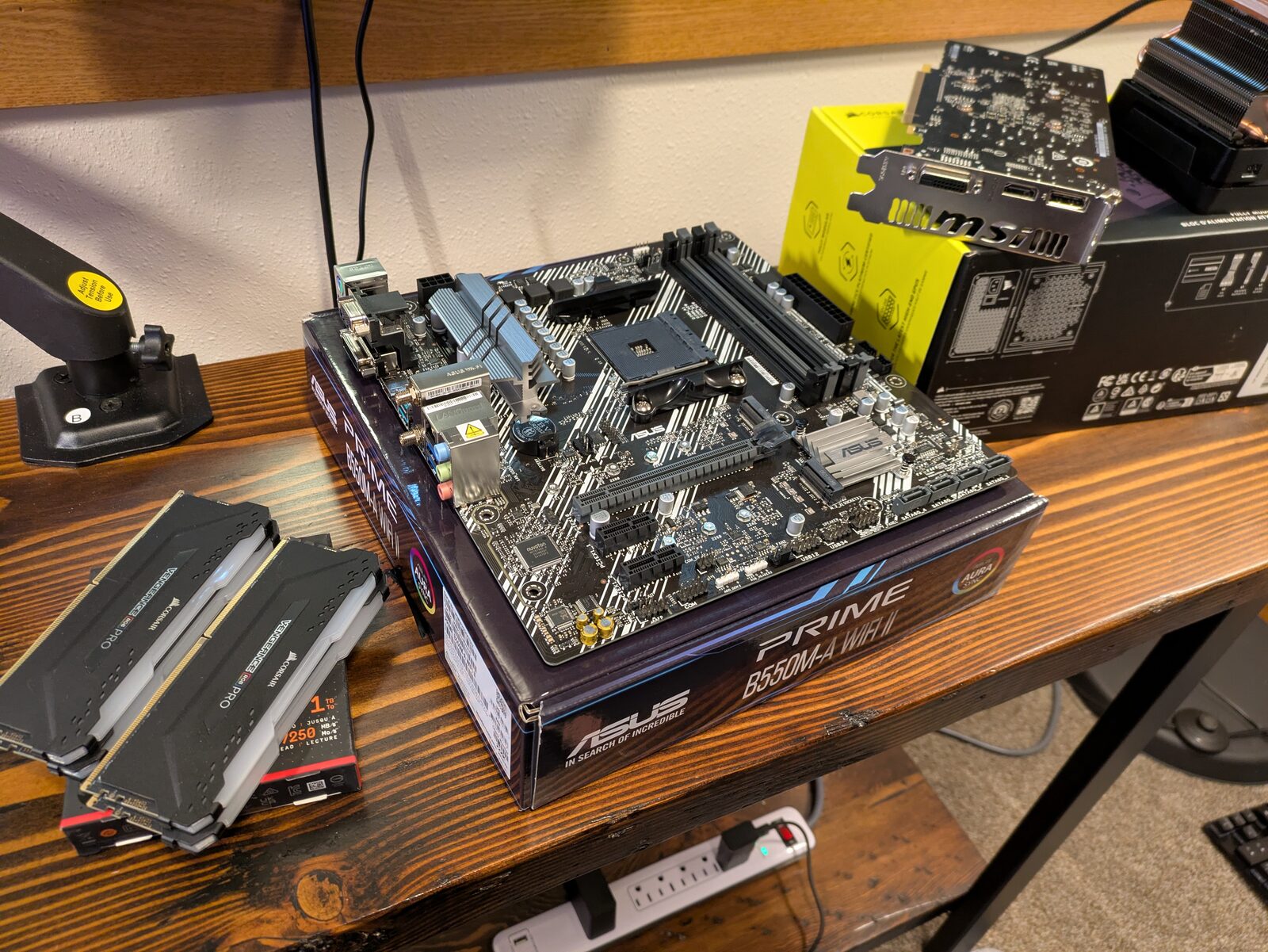 Parts for the new node.
The new machine came together fine once the working CPU arrived. Bench tested it outside the case first, which is one of those things that feels like an unnecessary extra step right up until the moment it saves you from disassembling an entire build to find out which part is bad.
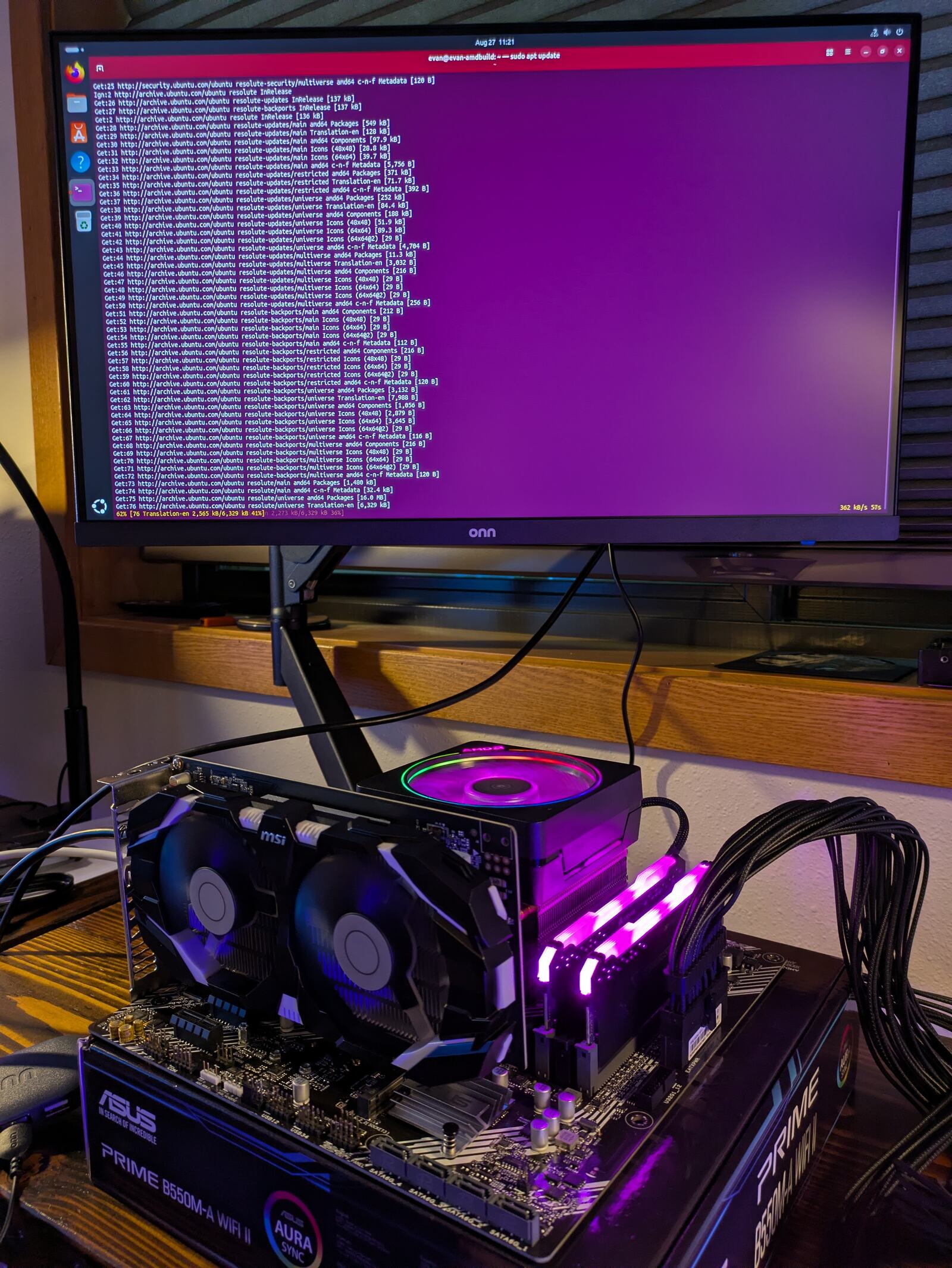 Bench tested outside the case before assembly.
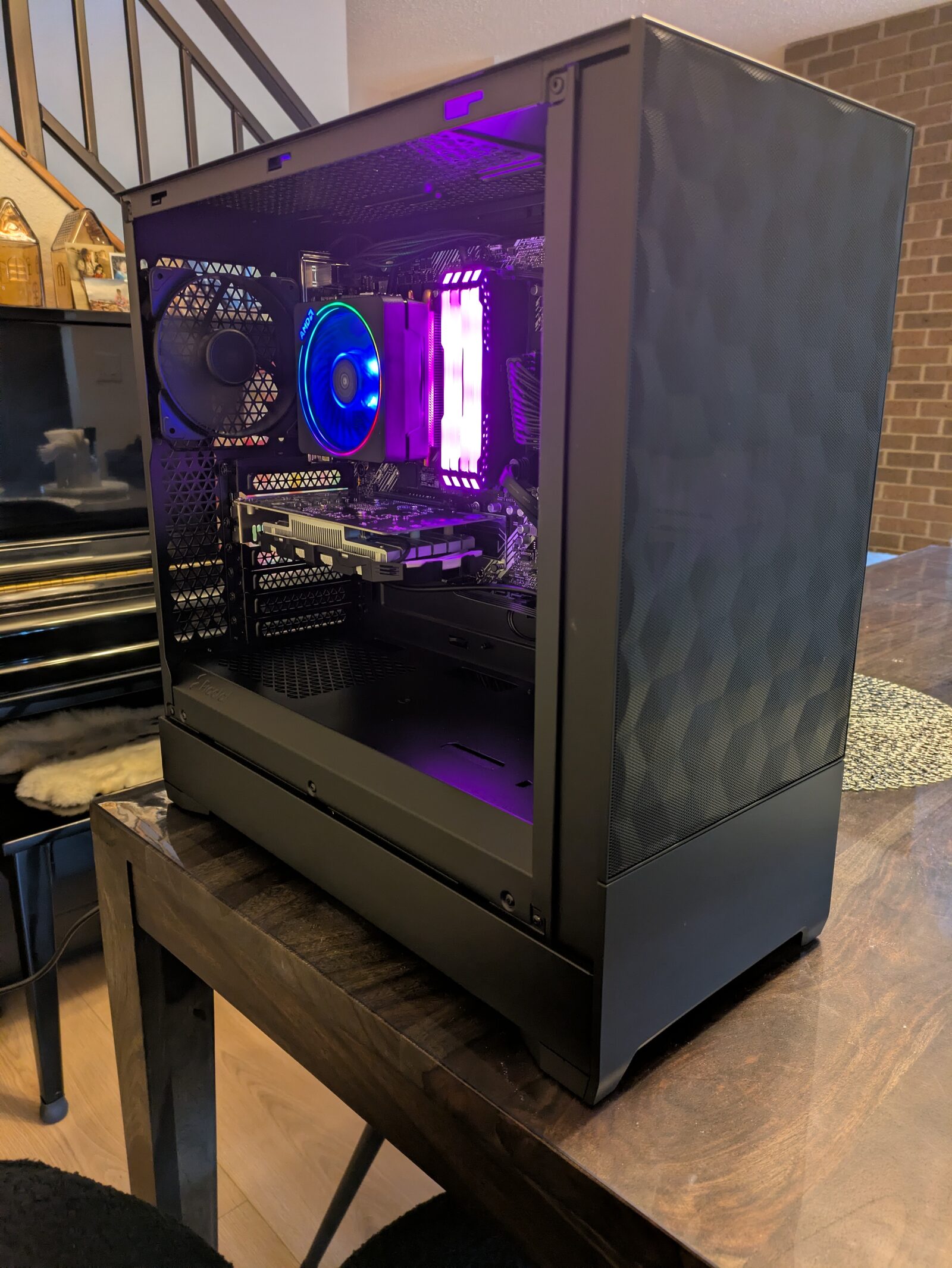 The completed build.
The basement problem
Here is the constraint I could not engineer my way out of. The coax comes into the second floor. The modem and the router live up there. The servers needed to live in the basement utility room, because that is where it is cool, where there is space, and where my wife does not have to look at them.
Running actual ethernet between those two points is not something I can do in this building. So the link between upstairs and downstairs is a powerline adapter pair, which sends network traffic over the electrical wiring, and which gets me approximately 30 Mbit/s. That is not fast. On a gigabit home network that number looks genuinely bad.
Here is the thing though, and this is the part I actually think is worth writing down: 30 Mbit/s being “bad” is meaningless until you say what it is carrying.
I sat down and worked out what actually crosses that link. Cluster heartbeats - the constant chatter the three servers use to confirm each other is still alive - do NOT cross it, because all three machines sit on the same little switch in the basement. Backups do not cross it either, same reason. What crosses it is me loading the web interface, software updates, DNS queries, and eventually file transfers.
Only that last one actually hurts. And the first one, the cluster heartbeats, is the one that would have been genuinely dangerous, because that traffic is extremely sensitive to delay and a flaky link carrying it would have made the whole cluster fall over intermittently for reasons that would have looked like absolutely anything else.
THE LINK LOOKED LIKE THE BIGGEST RISK IN THE ENTIRE BUILD AND IT TURNED OUT TO CARRY ALMOST NONE OF THE TRAFFIC THAT MATTERS. I would not have known that without writing out the list.
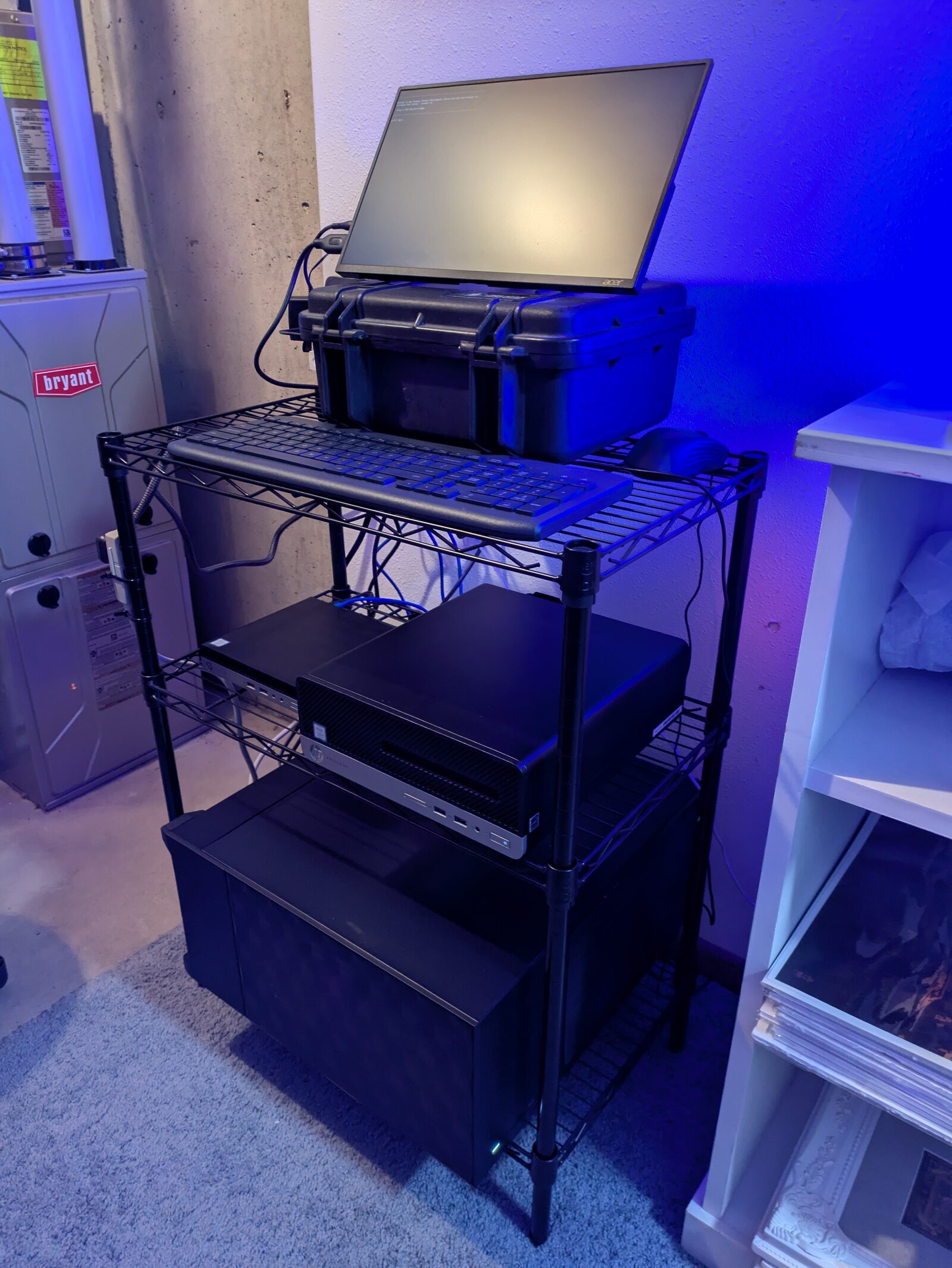 The rack. It is a shelf.
That is my rack. It is a shelf. Anyways, moving on…
Building the thing
The installs themselves were unremarkable, which is the correct outcome for an installer. Three machines, three installations, roughly the same screens each time.
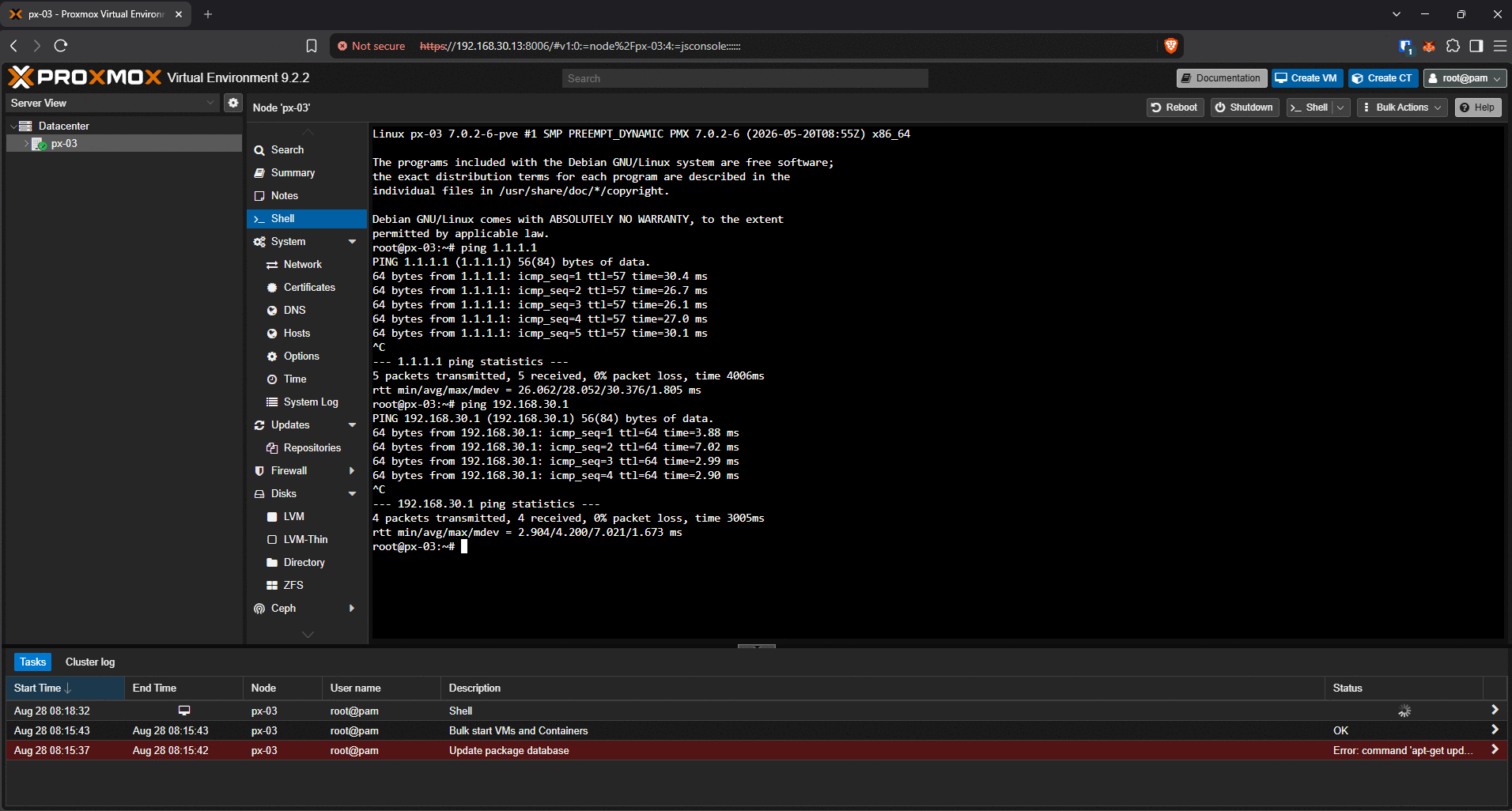 First login to the PX-03 web interface.
The first genuinely interesting decision came at the point of joining the three machines into a cluster, and it went against the advice I had written down for myself weeks earlier.
The conventional wisdom is to wait. Get the layout settled first, then cluster, because leaving a cluster later is much harder than joining one now. That is true and it is good advice. It is also outweighed by a hard mechanical rule that I did not know about:
/////BEGIN QUOTE///// A Proxmox node that already holds any virtual machine or container CANNOT join a cluster. The join command refuses. The node has to be emptied first. /////END QUOTE/////
Which flips the whole thing. Waiting does not defer the cost - it creates one, because every VM I built in the meantime would have to be destroyed before its machine could join. All three were empty right at that moment. That was the cheapest the operation was ever going to be, so we did it right then.
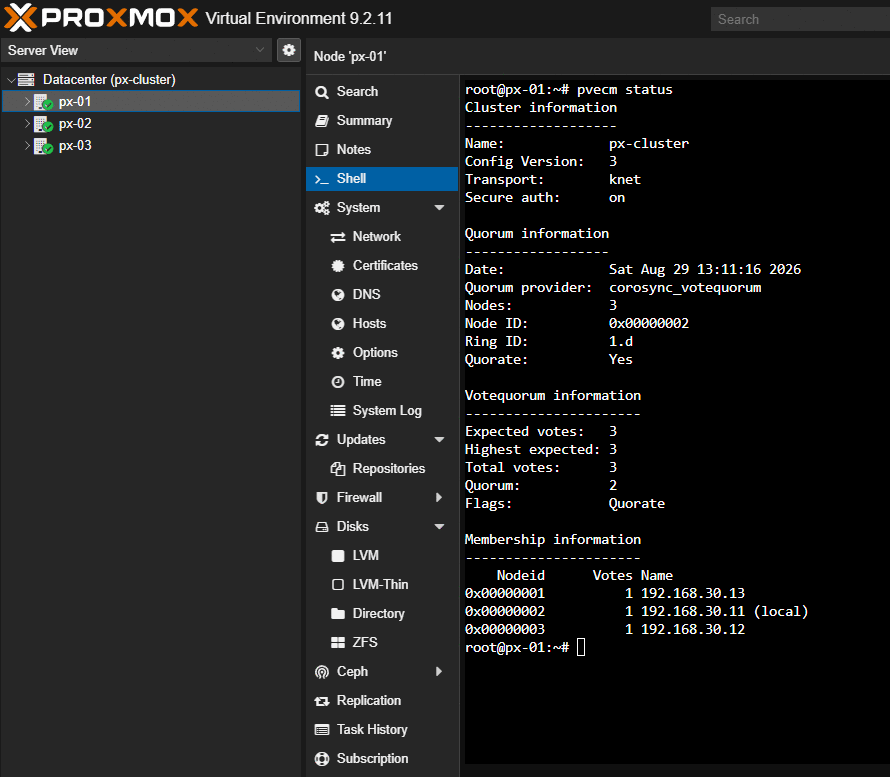 Three nodes, three votes, quorum of two.
Three nodes, three votes, quorum of two. Which means the lab machine can be powered off whenever I want without anything else caring. That was the whole point of having three boxes instead of one.
And then DNS did not work for two days
I was building a DNS resolver. Not the filtering kind that blocks ads - the layer underneath that, the part that actually goes out and finds the answer.
Every single query came back SERVFAIL. Every one. Including the test that is specifically designed to succeed.
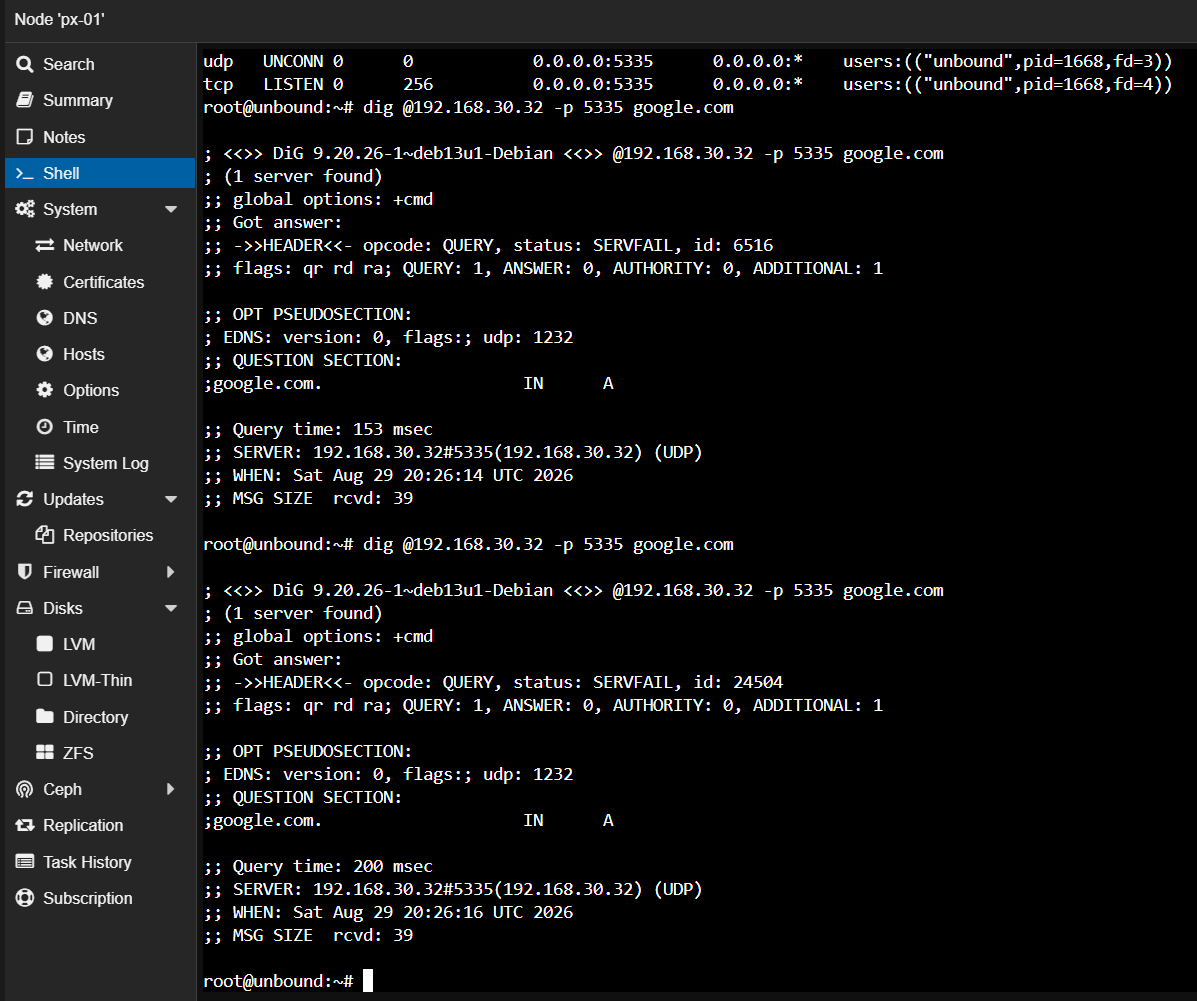 Every query came back SERVFAIL.
And here is the trap I nearly walked into, which I think is the most useful thing in this whole post. There is a standard pair of tests for checking that DNS security validation is working. One name is supposed to come back fine, and one name is supposed to fail. Mine failed. Correctly!
Except the other one failed too. And so did everything else. A TEST THAT GIVES YOU THE RIGHT ANSWER FOR THE WRONG REASON IS WORSE THAN A TEST THAT JUST FAILS, because a failing test makes you go look, and a falsely passing one makes you move on.
What a resolver actually does
Worth a plain-language detour here, because the rest of this does not land without it.
Think about how you would find a specific office in a large government building with no directory in the lobby. You ask the security desk at the front, and they do not know where that office is, but they know which floor handles that department. You go to that floor and ask the desk there. They do not know either, but they know which wing. You ask at the wing. Eventually somebody actually knows, and tells you the room number.
That is recursion. Nobody in the chain knows the whole answer, and every one of them knows who to ask next. A recursive resolver starts at the root servers - the front security desk of the entire internet, and there are thirteen of them - and walks down until it reaches a server that is actually authoritative for the name you asked about.
The alternative, which is what most people’s computers do, is to ask one big public resolver and take its word for it. That works fine. It also means that resolver sees every single thing you look up.
Simply put: recursion means finding out for yourself instead of asking somebody who will remember that you asked.
Finding it
Two commands solved this, and neither of them was a guess.
The first one splits the problem in half. There is a flag you can send with a DNS query that says “do the lookup, but skip the security validation step.” If the query works with that flag and fails without it, your problem is validation. If it fails both ways, your problem is the lookup itself.
It failed both ways. So validation was innocent, and the actual lookup was broken. Half the search space gone with one command.
The second one asked a root server directly, with a flag telling it not to go asking anyone else. And the answer that came back was wrong in three separate ways at once:
- It said REFUSED. Serving that particular record is the one job a root server has. It cannot refuse.
- It came back in 7 milliseconds. From a basement, over a powerline adapter, to a root server. My own queries to a machine sitting three feet away were taking 200 milliseconds.
- It had the “recursion available” flag set. Root servers do not do recursion. They never set that flag. Not ever.
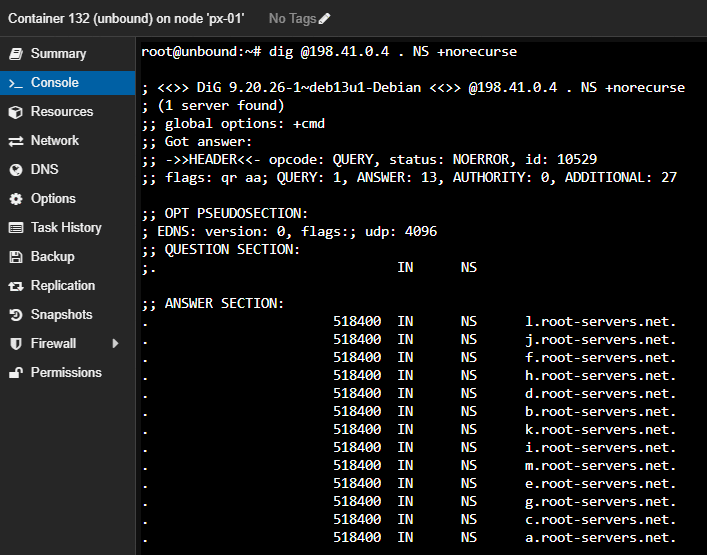 A response that could not have come from a root server: REFUSED,
 ra set, 7 ms.
So whatever answered that query was not a root server. Something in between was grabbing DNS traffic and answering it itself.
It was my router. It has a feature that transparently intercepts DNS to cache and filter it, which is a genuinely good feature for the devices in my house and an absolute catastrophe for a machine whose entire job is going out and asking questions directly. My resolver was getting its very first question answered by something that had no idea what the root of the internet looked like, and it never got past step one.
The fix took about ninety seconds once I knew what it was. The router lets you exempt individual devices from that feature. One device exempted, nothing else on the network touched.
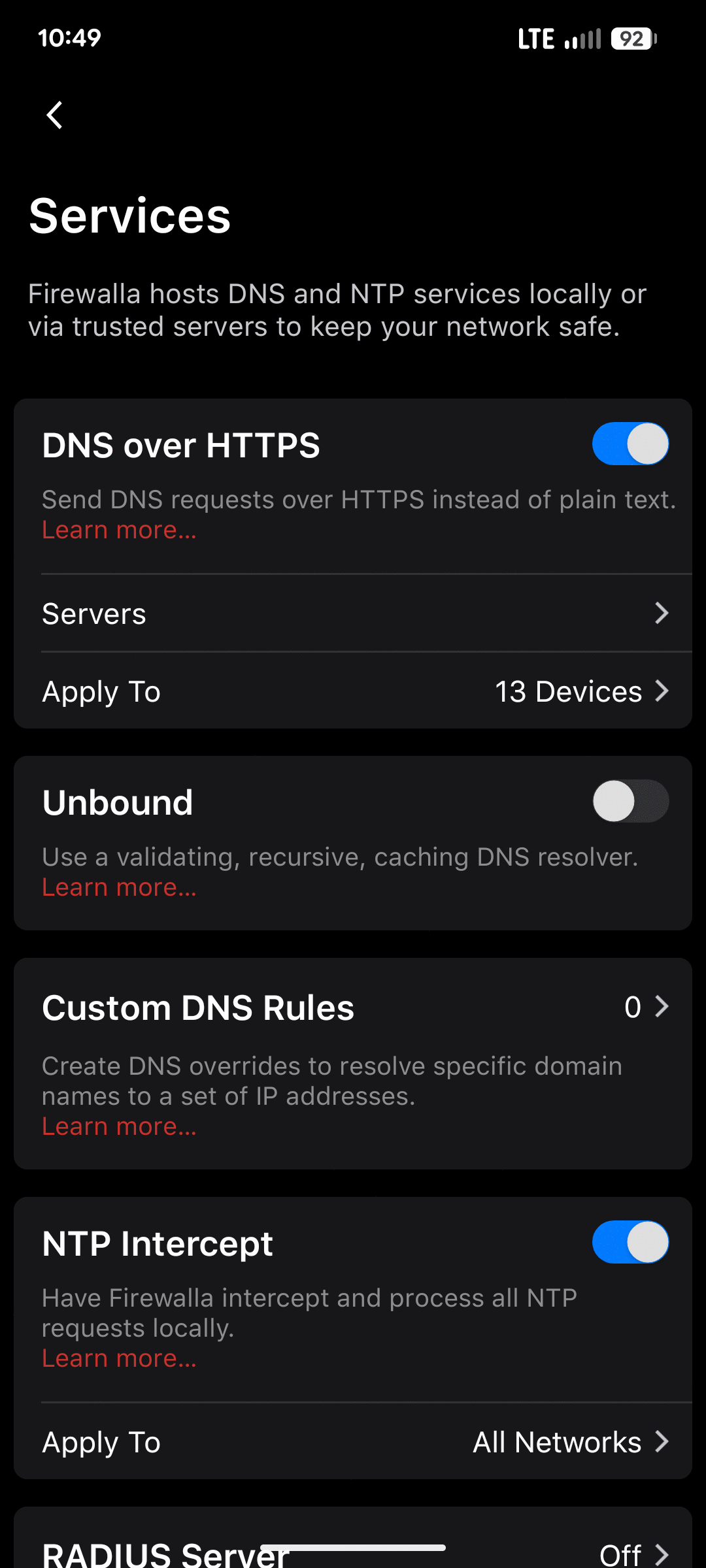 DNS interception and DNS-over-HTTPS excluded for VLAN 30.
Two days. Ninety seconds. That is just how it be sometimes.
The part I got wrong
I want to be specific about my own mistake here rather than vague about it, because the mistake is more instructive than the fix.
I had written in my own notes, weeks ago, that this router feature would need to be turned off before the ad-blocking layer would work. I had it filed as a client-side problem. Turn it off before pointing the household at the new DNS server.
That was incomplete, and the incompleteness is the whole lesson. A recursive resolver’s own outbound questions are also DNS traffic. Interception does not just stop clients from reaching the resolver, it starves the resolver itself. So that step was not part of a later cutover at all. It was a prerequisite for anything working, and I had it scheduled dead last.
Once the exemption was in place: cold query 294 milliseconds, same query again 1 millisecond from cache, security validation confirmed with the flag that only gets set when the cryptographic chain actually checks out.
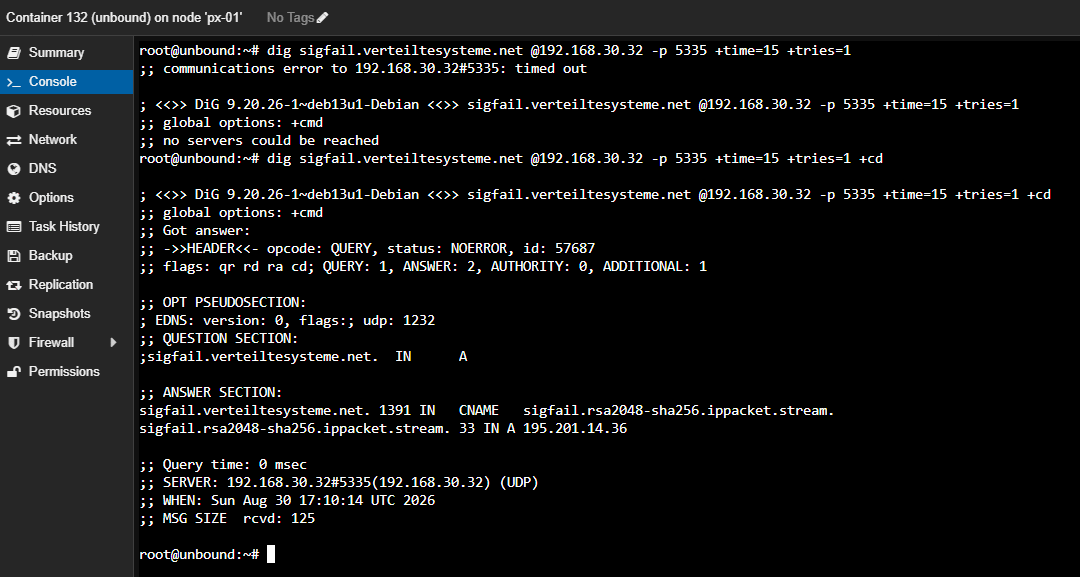 The
The ad flag: DNSSEC validation succeeded.
Backups, and one thing worth stealing
I will not walk through the whole backup build, but there is one decision in it that I think is genuinely worth copying regardless of what you run.
The backup server has its own user accounts and its own permission roles. The obvious move is to point the servers at it using an admin account, because that definitely works. What I did instead was create an account with a role that can create and read backups but cannot delete them.
The credentials sitting on my servers can add to backup history. They cannot destroy it. Which matters because the way ransomware actually beats backups is not by being cleverer than the encryption - it is by finding the credentials on the machine it just compromised and using them to wipe the restore points before it starts.
The trade-off is real and I had to configure around it: since that account cannot delete anything, the cleanup schedule has to live on the backup server itself instead of being driven by the servers. Which is fine. That is one setting.
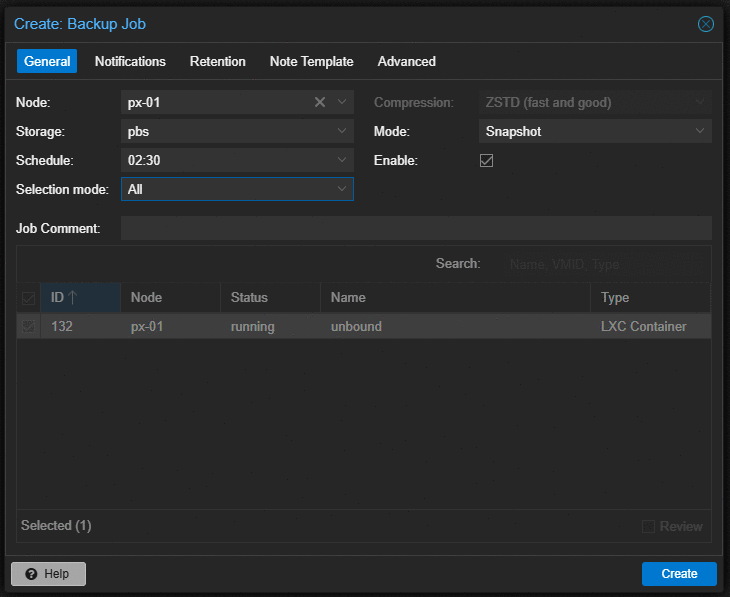 Creating the backup job for PX-01.
And then I ran the job manually and went and looked at the datastore to confirm a snapshot actually landed in it. A BACKUP JOB THAT HAS NEVER BEEN RUN IS NOT A BACKUP, IT IS A HOPE. I have an untested restore sitting in my notes from a previous project that has been quietly bothering me for weeks, and I did not want a second one.
The Deliniation of Work
Cards on the table, because I think this matters and because the alternative is letting people assume.
I did not do this alone. I worked through the entire build in a live conversation with Claude (Anthropic), and the division of labour was roughly this.
Claude did: the architecture reasoning, most of the “here is why this option beats that option” analysis, the exact commands and what every flag in them meant, the troubleshooting methodology when DNS broke, and the documentation. It also caught things I would have missed - it flagged that I was about to build a container with the wrong security setting, it caught that I was about to buy a Windows license I did not need, and it noticed that I had my own settled decision written down and was about to contradict it.
I did: every command, every physical action, every decision, and all the pushback. I built the machine. I ran the tests. I made the calls on what to do and what to skip.
And I want to be clear that the pushback was not decorative. Claude got things wrong, more than once, and in ways that cost me time:
- It recommended a permission role that turned out to be structurally incapable of doing the thing I needed, and I hit a 403 error because of it.
- It sent me down a completely unnecessary SSH rabbit hole to solve a problem that had a one-command answer sitting right there.
- It told me to run a command without telling me which machine to run it on.
- It handed me a config file reference and then never actually told me to create the file, so I sat there wondering why nothing worked.
- It predicted a default setting that turned out to be the opposite of what my system actually had.
Every one of those got corrected, most of them because I pushed back rather than because it noticed. THAT IS THE ACTUAL SKILL HERE. Not prompting. Reading the output, noticing when it does not match what you were told to expect, and saying so.
The documentation came out of the same conversation, and I want to name that plainly rather than let it read as though I typed it all up afterwards. What I did do is decide what goes in it, correct it where it was wrong, and refuse the parts I did not want.
Where it stands
Three machines, one cluster, one screen. Always-on services on one node, backups on another, a lab machine on the third that I can power off whenever I want without anything else noticing.
There are two things I deliberately did not do, and I wrote down the condition that would make me change my mind rather than a date to reconsider:
- SSH root password login is still enabled. It is only reachable from inside my own network, and the moment I put any remote access in front of it - a VPN, a port forward, anything - I close it. Not before.
- The lab’s isolated network does not exist yet. Because building it now means guessing at a design decision that belongs with the lab itself.
Next up is the ad-blocking layer, then network file storage, then rebuilding HomeBiz on top of all of it - this time as something I can tear down and stand back up from code instead of by hand.
Onward and upward, I say.
The full technical writeup, with the architecture decisions and verification evidence, is on the project page. The complete build procedure is published separately as a runbook, for anyone who wants to do this themselves - or for me, in a year, when I have forgotten all of it.